
Focowiki
Focowiki is a lightweight Markdown knowledge-base system for developers and product managers. It accepts cleaned .md files, extracts Markdown frontmatter and document signals, generates an OKF-style file knowledge base, stores source and generated files in S3-compatible storage, and exposes knowledge-base workflows through Admin UI, Admin API, and Developer OpenAPI.
Focowiki is useful for teams that already have Markdown knowledge assets and want a small self-hosted service that produces file-based knowledge for people, applications, and agents.
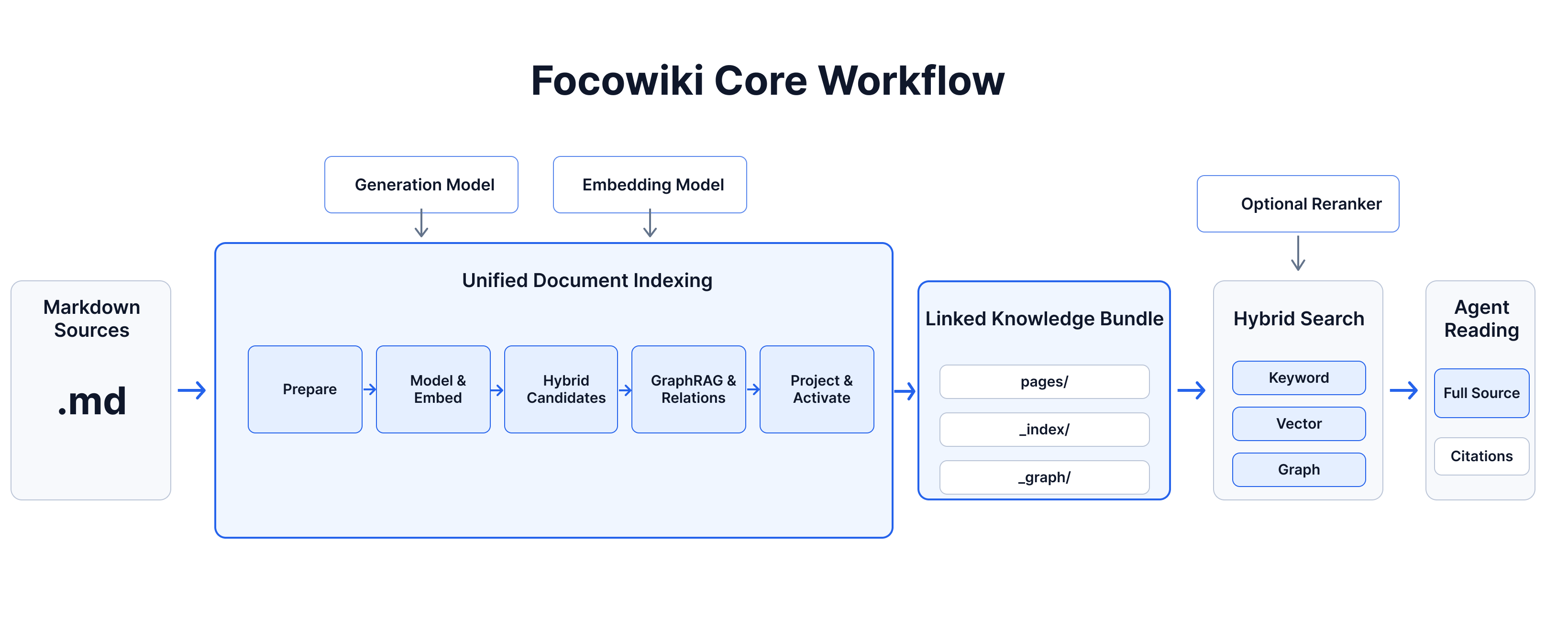
What Focowiki Provides
Focowiki takes Markdown files and folders and turns them into a knowledge base that people, applications, and AI agents can explore.
- Upload documents and folders. Add individual Markdown files or complete folder trees. Focowiki keeps their paths, names, metadata, links, and content.
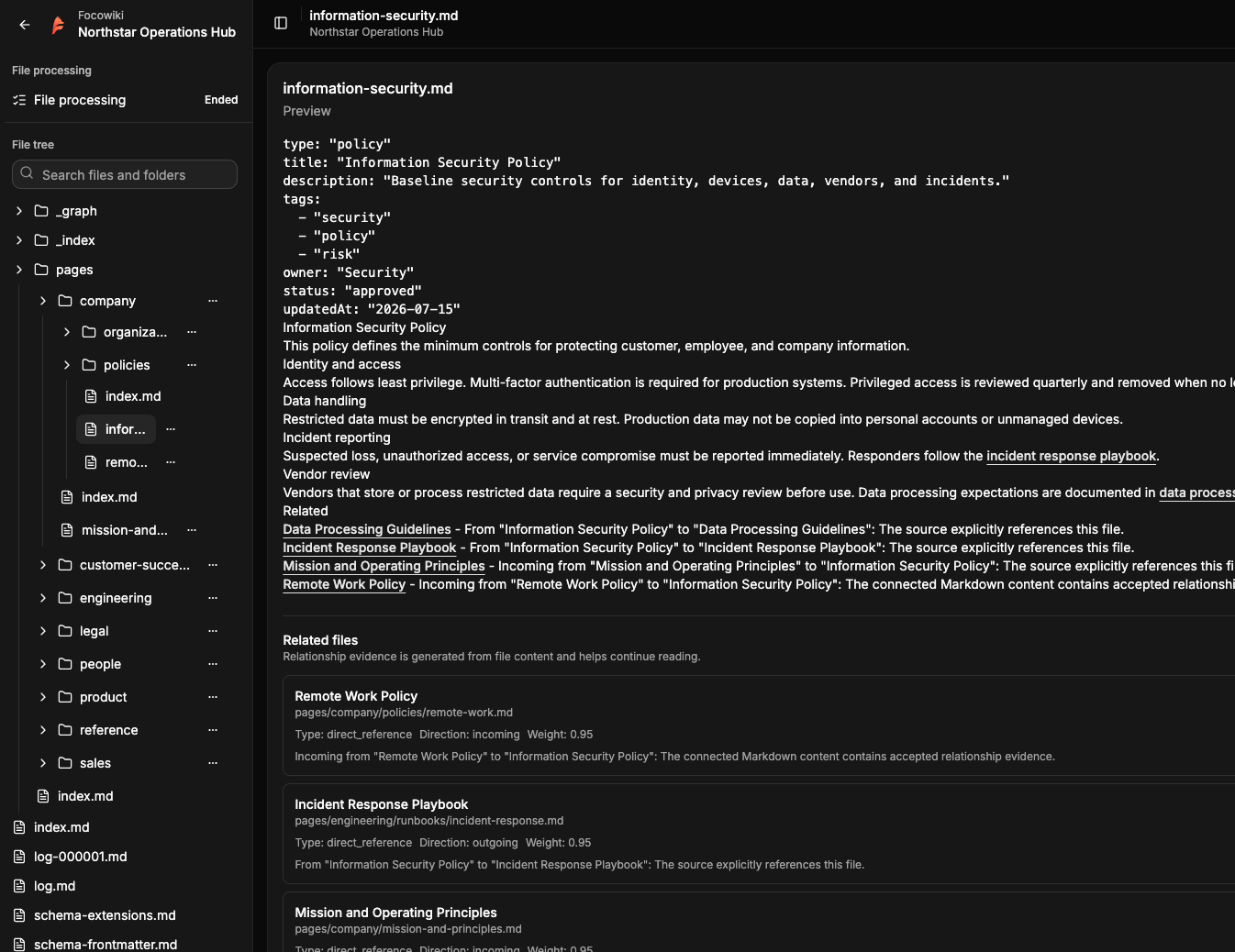
- Browse organized knowledge. Open documents from a file tree, move or rename files and folders, replace content, and remove outdated material.
- Find relevant documents. Search file content, browse directory indexes, follow related documents, and explore relationships through the knowledge graph.
- Connect applications and AI agents. Use the Developer OpenAPI to upload content, browse the file tree, read full Markdown files, search, follow graph relationships, and manage document changes.
- Manage the system from the Admin UI. Create knowledge bases, monitor file processing, configure models and runtime settings, and manage API keys.
- Deploy on your own infrastructure. Run Focowiki with Docker Compose, PostgreSQL, Redis, OpenSearch or Meilisearch, and S3-compatible storage.
Admin UI Preview
Open Knowledge Format
Google's OKF 0.2 announcement describes OKF as an open, portable, human-readable, and agent-readable way to represent knowledge with Markdown files and optional YAML frontmatter.
The pinned OKF 0.2 specification adds structured provenance, generation, verification, lifecycle, and Attested Computation metadata. Focowiki keeps the same practical file model: Markdown pages, YAML frontmatter, links, indexes, and a stable file tree.
Markdown Upload Format
Uploads accept .md files. Each file can be plain Markdown or include YAML frontmatter followed by Markdown body content. Every OKF 0.2 field below is optional for upload.
---
okf_version: "0.2"
type: "Guide"
title: "Customer Support Playbook"
description: "How the support team handles priority customer requests."
tags:
  - support
  - operations
sources:
  - id: "support-handbook"
    resource: "references/support-handbook.md"
generated:
  by: "publisher:docs"
  at: "2026-06-16T00:00:00Z"
verified:
  - by: "human:support-reviewer"
    at: "2026-06-16T01:00:00Z"
status: "stable"
stale_after: "2026-12-16"
---

# Customer Support Playbook

Use this playbook when a priority customer request arrives.

## Intake

Record the customer, request summary, severity, and expected response time.

## Related Documents

- [Escalation rules](./escalation-rules.md)
- [Incident handoff](./incident-handoff.md)
Common OKF-style fields:
| Field | Purpose |
|---|---|
type | Content kind, such as Guide or Attested Computation. |
title | Display title for the generated page. |
description | Short summary for readers and search. |
tags | Searchable tags. |
sources | Structured source IDs, resources, and optional usage windows. |
generated | Producer and event time when reliable generation evidence exists. |
verified | One or more machine or human verification events. |
status | Lifecycle value: draft, stable, or deprecated. |
stale_after | Date after which the content is considered stale. |
Additional safe frontmatter fields can be preserved. Missing, incomplete, wrong-type, or wrong-format OKF fields do not by themselves block upload. Raw frontmatter stays readable; unavailable normalized values are returned as null and are excluded only when a corresponding OKF search filter is used. Legacy timestamp remains readable as an explicitly identified fallback.
Markdown links are the primary relationship mechanism. Links in body content help readers and agents move from one generated page to related pages.
Product Flow
- Configure PostgreSQL, Redis, the selected search provider, S3-compatible storage, Admin credentials, bootstrap settings, and service ports.
- Start Focowiki with Docker Compose or local development commands.
- Open Admin UI, review runtime settings, and create a knowledge base.
- Upload one or more cleaned Markdown files.
- Watch source-file processing until each file ends.
- Read generated knowledge-base files through Admin UI or Developer OpenAPI.
- Use Developer OpenAPI keys for application integration and agent-facing backends.